What to Do With Your Water Softener After a Power Outage
A model-agnostic homeowner decision path for a softener after an outage, covering the clock, regeneration, drain flow, bypass, salt tank, and service triggers.
The short answer
After power returns, do not assume softeners reset alike. Record the outage length, inspect the display and valve, check whether the clock flashes, and watch for regeneration or continuous drain flow. Reset time only when the controller calls for it. Schedule regeneration with a steady clock and normal conditions. Use bypass and seek service for abnormal drain flow, flooding, salty water, an unusually high brine tank, or a controller that will not return to a known state.After power returns, do not immediately force a regeneration or assume the softener is broken. First record the outage duration, restore the controller to a visible state, and observe five things: whether the clock is flashing, what the valve or status display says, whether water is running to the drain, what the brine tank visibly contains, and whether the household water is clear and normal-tasting. Then use the state you can see—not the outage duration alone—to choose the next action.
Reset the time when the controller is flashing or showing the wrong time. Schedule a regeneration only after the clock is steady, the controller is in a normal state, and the manual supports that command. Use the external bypass only when it is clearly identified and the manual or manufacturer guidance supports its use. If water is continuously draining outside a documented regeneration, the brine tank is unusually high or overflowing, water is salty or abnormal, the floor is wet, or the controller cannot return to a known state, bypass if safely available and call for service.
Treat outage duration as a clue, not a diagnosis #
The same power interruption can produce different results because softener controls do not share one memory design. GE says the systems covered by its support article retain settings and the correct time for 24 hours. After that, GE says the other settings remain but a flashing display means the time should be reset. GE’s power-outage guidance also says water can continue to be softened while the clock is flashing.
Whirlpool’s WHES48 manual describes a shorter, model-specific memory window: the electronic control keeps settings for several hours; while power is out, the display is blank and the softener does not regenerate. The manual says the owner needs to reset the time only when the restored display is flashing or presenting the set-time screen. The WHES48 manual also says an incorrect clock can shift future regenerations even if the unit continues to soften water.
EcoWater gives a different warning for a long outage: some controllers may show the model code and software version and then enter basic programming. Its support instructions say to identify the correct model code if the display shows all dashes. EcoWater’s startup guidance is a reason to stop and identify the exact controller rather than guessing at hardness, capacity, salt dose, or a factory reset.
These examples establish the important limit: “the outage lasted eight hours” is not, by itself, a safe instruction. One system may have preserved its clock, another may need the time reset, and a third may be asking for model-specific programming. EPA WaterSense’s current maintenance guide therefore recommends checking the programming after power is restored and resetting the clock when needed. It does not give a universal outage threshold or tell every owner to regenerate. EPA’s softener maintenance guide says regeneration should occur only as needed because unnecessary cycles waste salt and water.
Make a safe observation and resolve the documented cycle state before changing settings #
You can collect useful evidence without opening the control head or dismantling plumbing. Keep the first pass visual and external. There is no universal observation time: if the controller shows an active regeneration, continue watching from a safe location until the exact model's manual defines the cycle as complete, or until a warning sign requires you to stop and escalate.
- Record the event. Write down when power failed, when it returned, whether the outage was a momentary interruption or an extended loss, and whether the home also lost municipal water pressure or well-pump service. Do not turn an estimate into a false precise duration.
- Look at the electrical condition from a dry location. Check whether the transformer is visibly connected and whether the display is blank, steady, flashing, beeping, or showing a model code or error message. Do not plug in a wet, damaged, or visibly compromised transformer. A tripped breaker, damaged cord, burning smell, water at the outlet, or repeated breaker trip belongs with a qualified electrical or appliance professional.
- Photograph the display and the rating label. Capture the model and serial number, the clock, any “recharge,” “regenerate,” “service,” or error message, and the external bypass position. Do not press buttons repeatedly to see what happens; an accidental factory reset can erase settings that a technician will need.
- Identify the valve state. Some units show service, bypass, recharge, or a cycle position on the head. Others use a separate bypass handle. Do not infer that a handle is in service or bypass from its shape alone. Use the diagram on the unit or the exact owner’s manual.
- Watch the drain without touching the hose. Note whether it is dry, trickling, or flowing strongly. Start a timer only if the area is dry and safe to observe. A drain running during a documented regeneration may be expected for that model; a drain that continues with no status indication, continues well beyond the manual’s stated cycle, or threatens a floor or pump is a service branch.
- Inspect the brine tank from above. Record whether salt is present, whether the salt level appears to be falling normally over time, whether there is visible standing water, and whether water is above the salt, rising, spilling, or present on the floor. Do not reach into the tank, pour salt into the narrow brine-well tube, or dismantle a float assembly during this first check.
- Check water at a cold tap only after the system is in a stable, non-leaking state. Note clear versus cloudy water, a salty or otherwise abnormal taste, odor, or a sudden change from the home’s usual water. A softener does not disinfect water. The Whirlpool manual warns not to use its system for microbiologically unsafe or unknown water without adequate disinfection upstream or downstream. If the outage involved flooding, a damaged well system, or a drinking-water advisory, follow the utility or health authority’s instructions instead of treating the softener as a water-safety device.
Do not open an energized control box, test live wiring, open a well, pull a pump, enter a tank or other confined space, loosen pressurized fittings, remove the valve head, or manipulate internal pressurized equipment. Those actions are outside this homeowner decision surface. A professional can make the electrical, plumbing, valve, well, and water-quality determinations safely.
Use the observable state table to choose the branch #
The table below is the practical decision surface. “Manual” means the owner’s manual for the exact model, not a general video or another brand’s instructions.
| What you observe after power returns | What it may mean | Safest next step | What not to infer |
|---|---|---|---|
| Clock is steady, current, and no regeneration or error message is shown | The controller may have retained its program and is in service | Photograph the normal state, confirm the bypass is in service, and leave settings alone unless the manual identifies another check | A steady clock does not prove the valve completed an interrupted cycle or that the resin has full capacity |
| Clock is flashing or visibly wrong, but the unit otherwise appears normal | Time memory was lost or the controller is asking for confirmation; future regeneration can occur at the wrong time | Set only the current time using the exact manual; confirm AM/PM or 24-hour mode if the display uses it | Do not assume hardness, salt dose, capacity, or other settings were lost just because the clock is wrong |
| Display shows model code, all dashes, setup, or software information after a long outage | The controller may have entered startup or programming | Stop button-pushing; photograph the screen, identify the model, and follow the exact programming sequence or call the manufacturer/service provider | Do not enter a guessed model code or factory defaults |
| “Recharge,” “regenerate,” or a cycle position is active and the drain is flowing | The unit may be completing a regeneration that was interrupted | Keep people from the wet area, compare the state and expected duration with the manual, and observe without opening anything | Do not call every active drain an immediate failure, and do not assume every brand resumes the same way |
| No cycle is shown but drain flow continues, intensifies, or threatens a floor or drain pump | A valve, controller, drain, or cycle may be malfunctioning; prolonged flow can cause water damage | If the external bypass is clearly identified and the model instructions support using it, place the unit in bypass; if not, call service promptly and protect the area from overflow | Do not leave a questionable flow running while searching for a generic reset sequence |
| Water is salty or unusually abnormal after the outage or cycle | Regeneration, brine draw, bypass position, or another water condition may need diagnosis | Stop using the abnormal water for drinking or cooking until the cause and water safety are clarified; use the manual/manufacturer and service provider, and keep a sample only if a professional requests one | Taste alone does not prove that the softener is the only cause or that flushing will fix it |
| Brine tank is low on salt with no leak or overflow | The system may simply need the approved salt product, but the correct level and product depend on the manual | Check the manual’s salt type and fill guidance; add only the specified product and keep it out of the brine well | Do not use a post-outage regeneration as a substitute for checking a salt bridge, clog, or lost programming |
| Water is unusually high, rising, overflowing, or on the floor | A brine valve, float, drain, connection, or controller problem may be present | Use bypass if safely accessible and model-supported; shut down the response and call service if water damage or electrical exposure is possible | Do not assume a visible water level is normal across brands or try to repair a float while pressurized |
| Bypass is already engaged | The home may be receiving untreated water and the softener may not be participating | Photograph the position, find the exact bypass diagram, and return to service only after the manual says the controller and valve are ready | Do not assume bypass stops a drain cycle on every design |
The table deliberately uses “may.” The observable evidence narrows the next action; it does not identify a failed part. That distinction prevents a homeowner from authorizing a control-board replacement when the actual issue is a lost clock, or from leaving a stuck valve draining because the display looks normal.
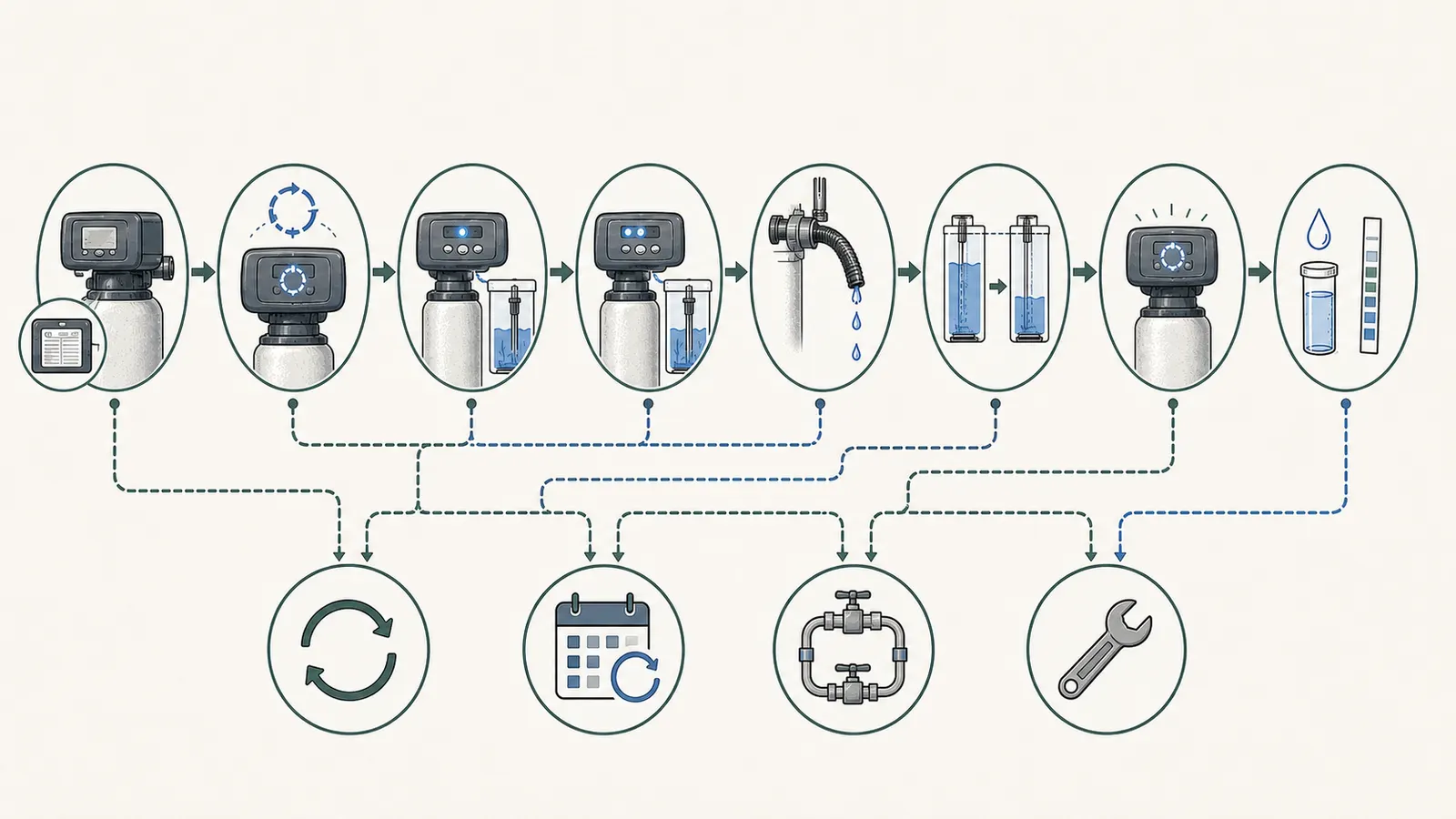
Reset the clock before you schedule a regeneration #
There are three separate actions that are often collapsed into one: restoring the time, starting a regeneration, and restoring a controller’s program. Treat them separately.
Reset time when the controller asks for it
If the display flashes, shows the wrong current time, or presents a set-time screen, use the manual’s time-setting sequence. Record the original display before changing it. Verify the hour, minutes, AM/PM or 24-hour setting, and the scheduled regeneration time if the controller exposes that setting. A clock correction is not the same thing as a factory reset.
GE says a flashing time can leave the water softening function operating while causing a future recharge at the wrong time. Whirlpool’s WHES48 manual makes the same practical distinction: the unit can continue to soften while an incorrect clock changes when regeneration occurs. That is why a steady, correct time is the gate before you choose a manual recharge.
Schedule a regeneration only when the system is ready
Do not regenerate solely because the power went out. The outage may have happened while the softener was idle, or the controller may already be completing the interrupted cycle. EPA says to regenerate only as necessary and to account for the model’s capacity, incoming hardness, and household water use when scheduling a cycle.
If the exact manual calls for a manual recharge after the event, verify all of these first:
- the clock is steady and correct;
- the display is not asking for a model code or missing setup values;
- the bypass is in the position required for regeneration;
- the drain is secure and can discharge safely;
- the brine tank contains the specified salt or brine condition;
- there is no active leak, overflow, salty water, or unexplained drain flow; and
- the cycle duration and completion indication are known for that model.
Whirlpool’s current manual-recharge instructions illustrate the sequence for compatible systems: the clock must be steady and current before the owner starts a manual recharge, and the support article describes a cycle of about two hours. That is a Whirlpool instruction, not a universal duration. GE describes an approximately 90-minute recharge for the systems in its outage article. An older EcoWater VIP-1E manual shows still other programmable times and control modes, including a model-specific recharge time. These differences are why a generic “hold the button for three seconds” instruction is not appropriate here.
Use bypass for a contained abnormal condition, not as a cure
An external bypass can keep household plumbing supplied while removing the softener from service. The Whirlpool WHES48 manual describes bypass as a way to turn off water to the softener for maintenance while leaving water in the house pipes. But the handle direction, labels, and effect on an active regeneration vary. GE specifically says its bypass can stop drain flow during an interrupted recharge; that statement should not be transferred to another valve.
Use the bypass only when it is clearly labeled, reachable without opening equipment, and safe to turn from a dry location. If the valve resists, stop. Do not force it, loosen it, or remove a cover. If the manual does not explain the valve and water is actively escaping, call service or the manufacturer with the photographs and model number.
Check the brine tank and water without guessing at “normal” levels #
Salt-based softeners use brine to regenerate resin. EPA explains that the brine tank must be filled with appropriate sodium- or potassium-chloride pellets and that a salt bridge or clog can interfere with brine formation and movement. EPA’s maintenance guidance says water above the salt pellets is a signal to add more salt, but it does not make one universal tank-water height normal for every design.
After an outage, separate these conditions:
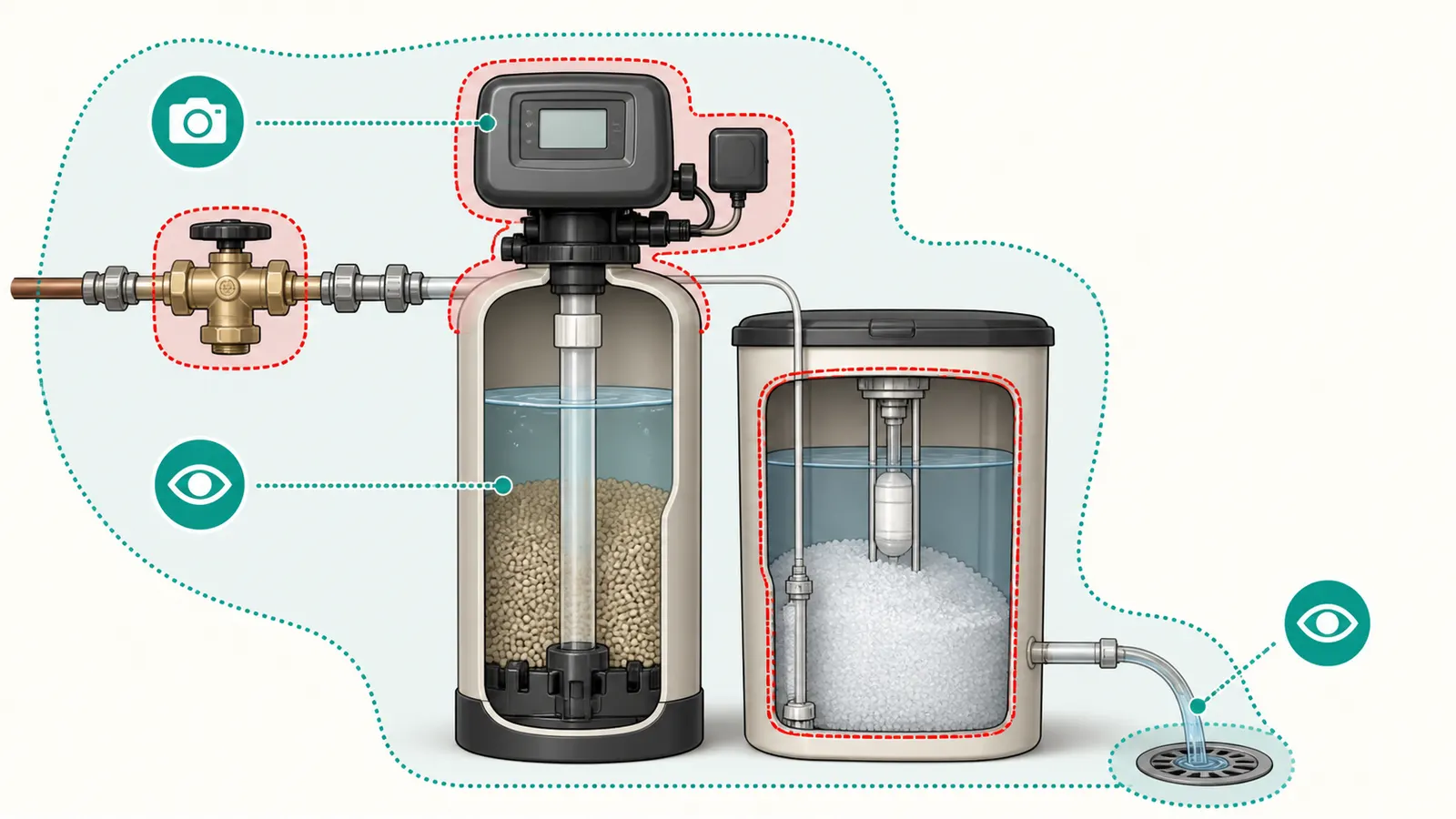
- Salt is present, the tank is not rising or leaking, and there is no abnormal water. Check the manual’s salt product and level guidance. Do not fill to the top just because the system was without power; excess salt can contribute to bridging in some systems.
- The salt level does not fall over time. That can be a bridge or clog, but it can also be a programming, brine, or usage issue. Do not break up a bridge blindly if the tank is flooded, the brine well is inaccessible, or the manual does not describe the homeowner procedure.
- Water is above the salt, unusually high, rising, or on the floor. Do not add salt. Use a clearly identified bypass if safe and call service. Record whether the drain was flowing and whether the display showed regeneration.
- Salt is dirty, melted, contaminated, or mixed with an unknown product. Do not start a regeneration to “wash it through.” Preserve the product label or photograph the material and ask the manufacturer or service provider what to remove and how.
- Water from a tap tastes salty after a cycle. Bypass if the manual supports it, stop using the abnormal water for drinking and cooking until the cause is understood, and arrange service. Possible causes include an incomplete or abnormal brine/rinse sequence, a valve state, or a separate water-quality event; the taste does not identify which one.
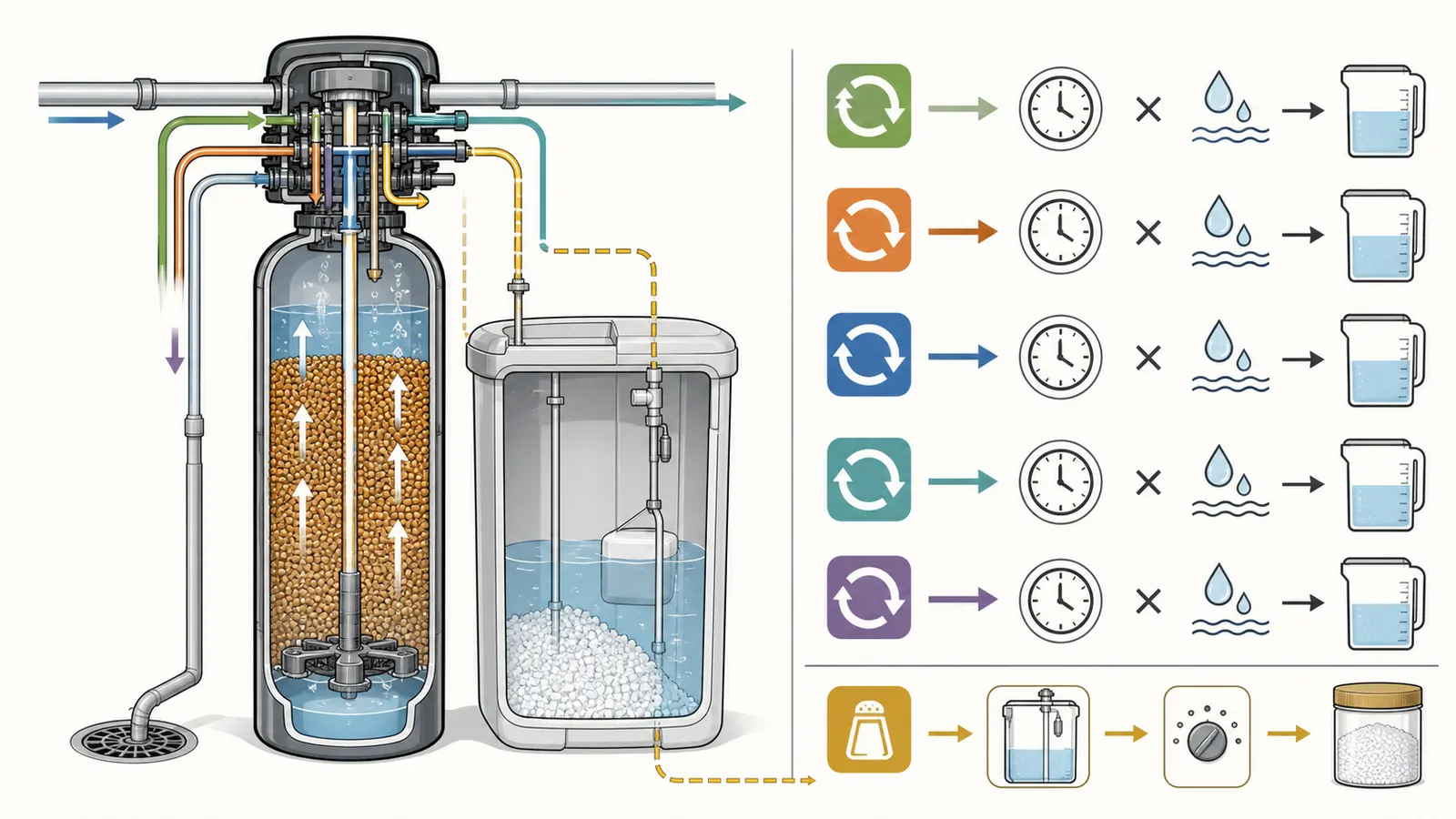
Whirlpool’s prolonged-out-of-service procedure calls for cleaning and re-establishing the salt tank before a manual recharge, but that is guidance for extended nonoperation on compatible Whirlpool units—not a reason to empty every tank after a brief outage. It also says programming may be lost after the system has been out of service for a while. Follow the exact manual if the outage was long enough to leave the tank dirty, the unit was shut down for an extended period, or the controller has re-entered setup.
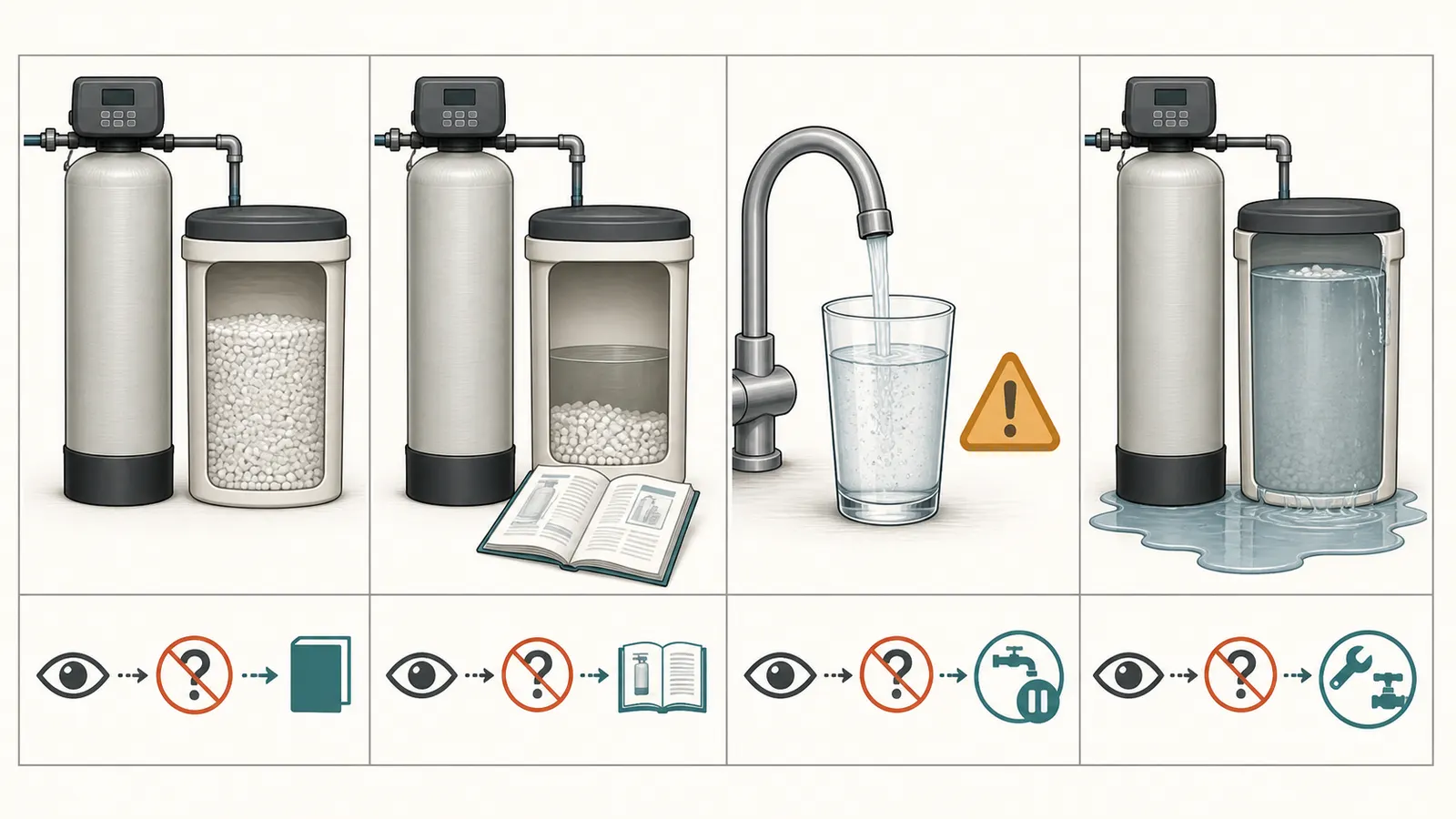
Treat continuous drain flow as a water-damage decision #
A regeneration intentionally sends water to a drain, so the first question is whether the controller shows an active cycle and whether the flow is within the exact model’s expected duration. The second question is whether the drain path can safely handle it.
GE says its controller may continue discharging through the drain when power is lost during its approximately 90-minute recharge, then finish after power returns. Whirlpool’s WHES48 manual says an interrupted regeneration will finish. EcoWater warns that, depending on model, a softener may release up to 40–50 gallons at up to 2 gallons per minute and that an unexpectedly long drain during a power outage can flood or damage a drain pump. EcoWater’s drain-pump guidance is model-bounded, but the homeowner lesson is broad: a drain pump and floor drain are not proof that an uncontrolled flow is safe.
If the flow is documented as an active regeneration, observe it from a dry location and compare the elapsed time with the manual. Do not use a generic brand’s cycle length. If the flow continues after the cycle should have ended, appears with no cycle status, pulses unexpectedly, or is approaching a floor, wall, septic system, or pump limit, treat it as abnormal. Put the unit in bypass only if the installed instructions say how and the valve moves normally. If bypass does not stop the flow or the valve is unclear, call service and, where safe, close the home’s water shutoff only under professional or manufacturer guidance; do not disassemble the softener to stop it.
EPA’s guide identifies a continuous trickle or flow to the drain as a possible broken valve or other malfunction. It also recommends checking connections, valves, and drains for leaks. This does not mean every drop during a normal cycle is a failure; it means unexplained or persistent flow deserves a time-stamped observation and a professional decision.
Know when to stop and hand over a useful service record #
Call the manufacturer or a qualified water-treatment professional when any of these remains true after the controller has power:
- the display is blank, repeatedly resets, beeps abnormally, or cannot get past model-code/setup screens;
- the clock will not hold the correct time or other programming disappears;
- a regeneration indicator remains active beyond the model’s documented cycle or the drain keeps flowing with no clear cycle state;
- the brine tank rises, overflows, leaks, contains damaged or contaminated salt, or has water on the floor;
- water is salty, cloudy, has an abnormal odor, or changes after the event and does not return to the home’s normal condition;
- the bypass is stuck, unlabeled, leaking, or does not produce the expected service/bypass behavior; or
- the outage involved flooding, a damaged well, a drinking-water advisory, electrical damage, or a loss of disinfection equipment.
Give the professional a compact record:
| Record | Write down or photograph |
|---|---|
| Event | Approximate outage start and restoration; whether the home also lost water pressure or well-pump service |
| Identity | Brand, exact model, serial number, controller version if shown, and the owner’s manual or installation label |
| Display | Clock before and after correction, flashing text, error code, model code, setup screen, and recharge indicator |
| Valve and flow | Bypass position, service/recharge position if shown, when drain flow started, whether it stopped, and where it discharges |
| Brine tank | Salt type, approximate salt condition, visible water level relative to salt, rising/overflowing water, leaks, and any foreign material |
| Water | Clear/cloudy appearance, salty or unusual taste/odor, which fixtures were affected, and whether the change persisted |
| Actions already taken | Time reset, button pressed, bypass movement, any manual recharge, and any breaker or outlet observation |
Do not claim that a post-outage hardness test, taste test, or a feeling of “slippery” water proves the softener is operating correctly. Those observations can help a professional triage the system, but they do not replace the controller’s diagnostics, a water-quality test, or a valve and drain inspection.
Once the issue is resolved, keep the corrected time and programming documented, confirm the bypass is fully in the intended position, and check the drain and floor again during the next scheduled regeneration. EPA recommends periodic checks for leaks and maintenance according to the manufacturer’s instructions. If the home uses a private well and the outage involved a repair, flooding, or a lasting change in water quality, ask the local health department or a state-certified drinking-water laboratory what testing is appropriate. The softener can condition hardness; it is not a substitute for well-system disinfection or drinking-water verification.
Cite this guide
Brictale. “What to Do With Your Water Softener After a Power Outage.” Published 2026-09-02; updated 2026-09-02.
https://brictale.com/water/softeners/water-softener-after-power-outage · Read the Markdown version
Sources and scope
Evidence behind this page
- GE says an interrupted softener control maintains settings and the correct time for 24 hours; after a longer interruption, settings are retained, but the time should be reset if the display and indicator are flashing.
GE Appliances — Water Softener: Power Outage Memory
GE support guidance for the softeners covered by that support article. It is not a universal memory duration for every brand or controller.
Accessed · Link to this claim - GE says that if power is lost during its approximately 90-minute recharge cycle, the softener may continue discharging through the drain until power is restored and the cycle completes; GE identifies its bypass valve as a way to bypass the softener and stop the drain flow in that situation.
GE Appliances — Water Softener: Power Outage Memory
GE-specific behavior and bypass instruction. The article uses it as evidence that an interrupted regeneration is a distinct branch, not as a universal cycle length or bypass design.
Accessed · Link to this claim - The Whirlpool WHES48 manual says its electronic control keeps all settings for several hours; while power is out the display is blank and the softener will not regenerate, and the clock must be reset only when the restored display indicates that it is flashing or asks for the current time.
WHES48 manual behavior. It demonstrates why a brand-neutral guide should not convert one controller's memory period into a universal outage threshold.
Accessed · Link to this claim - The Whirlpool WHES48 manual says that if the softener was regenerating when power was lost, it will finish the cycle after power is restored, even if the clock is incorrect after a long outage.
WHES48 manual behavior only. Other valves can resume, restart, stop, or require a model-specific recovery sequence.
Accessed · Link to this claim - EcoWater says that after a long power outage some controllers first show the model code and software version and then enter basic programming; it directs the owner to set the correct model code when the display shows all dashes.
EcoWater Systems — What Should Be Displayed on the Screen When It First Turns On?
EcoWater controller guidance for the models covered by that support article. It supports stopping to identify the exact model rather than blindly applying a factory reset or guessed settings.
Accessed · Link to this claim - EPA WaterSense says to double-check a softener after power is restored to ensure it is still programmed correctly and to reset the clock; it also says regeneration should occur only as needed because regenerating too frequently wastes salt and water.
U.S. EPA WaterSense — Guide to Selecting and Maintaining a Water-Efficient Water Softener
EPA consumer maintenance guidance for cation-exchange softeners. It does not prescribe a universal post-outage regeneration command or a universal clock-retention period.
Accessed · Link to this claim - EPA WaterSense says a continuous trickle or flow of water to the drain could indicate a broken valve or other malfunction and recommends periodically checking softener connections, valves, and drains for leaks.
U.S. EPA WaterSense — Guide to Selecting and Maintaining a Water-Efficient Water Softener
EPA warning sign for residential softeners. A normal regeneration can also send water to a drain, so the article uses duration and the controller state to distinguish an active cycle from an unexplained continuous flow.
Accessed · Link to this claim - EcoWater says that, depending on the model, its softeners can release up to 40–50 gallons at a maximum flow rate of 2 gallons per minute, and warns that unexpectedly prolonged draining during a long power outage can flood or damage a drain pump.
EcoWater Systems — Can a Water Softener Drain to a Pump?
EcoWater's stated model-dependent range and pump warning. It is not a measurement for another brand or a substitute for the installed unit's manual and drain design.
Accessed · Link to this claim - The Whirlpool WHES48 manual says a bypass valve can turn off water to the softener for maintenance while leaving water in the house pipes, and labels the valve positions for service and bypass.
WHES48 bypass arrangement. Valve shape, direction, and whether bypass stops an active drain cycle vary by model, so the article requires the homeowner to use the installed manual or a clearly labeled valve.
Accessed · Link to this claim - Whirlpool's current support instructions say the display clock should be steady and show the current time before starting a manual recharge; the support article describes a cleaning cycle of around two hours.
Whirlpool Water Solutions — How do I start a manual recharge?
Current Whirlpool support instructions for compatible Whirlpool systems. It supports the sequence of clock first, regeneration second, not a universal two-hour duration.
Accessed · Link to this claim - The EcoWater VIP-1E manual describes a model-specific recharge-time setting and separate control modes for softeners, including a programmed recharge time rather than a universal regeneration schedule.
EcoWater Systems — Softener Installation and Operation Manual, VIP-1E Control
Older EcoWater VIP-1E control manual. It is used only to demonstrate controller variation; it does not prescribe settings for another EcoWater model or any other brand.
Accessed · Link to this claim - Whirlpool's current guidance for a softener that has been out of service for an extended time says programming may be lost, the salt tank may need cleaning, and a manual recharge should be run only after the system is reprogrammed; it describes that cycle as about two to two and a half hours for the covered systems.
Guidance for prolonged nonoperation on compatible Whirlpool systems, not a mandatory cleaning procedure after every brief outage.
Accessed · Link to this claim