What Does a UV Water System Alarm Mean?
A model-neutral homeowner guide to UV alarms: identify the code, separate maintenance from unsafe dose, and decide when to stop drinking.
The short answer
A UV alarm means the controller cannot confirm intended disinfection performance. Do not trust a glowing lamp or clear water. Record the exact code, lamp age, UV level, power and filter events, then follow the model manual. If the controller reports unsafe low UV, lamp failure, or no verified dose, stop using the water for drinking and cooking until corrected and cleared by required testing or local health guidance.What Does a UV Water System Alarm Mean?
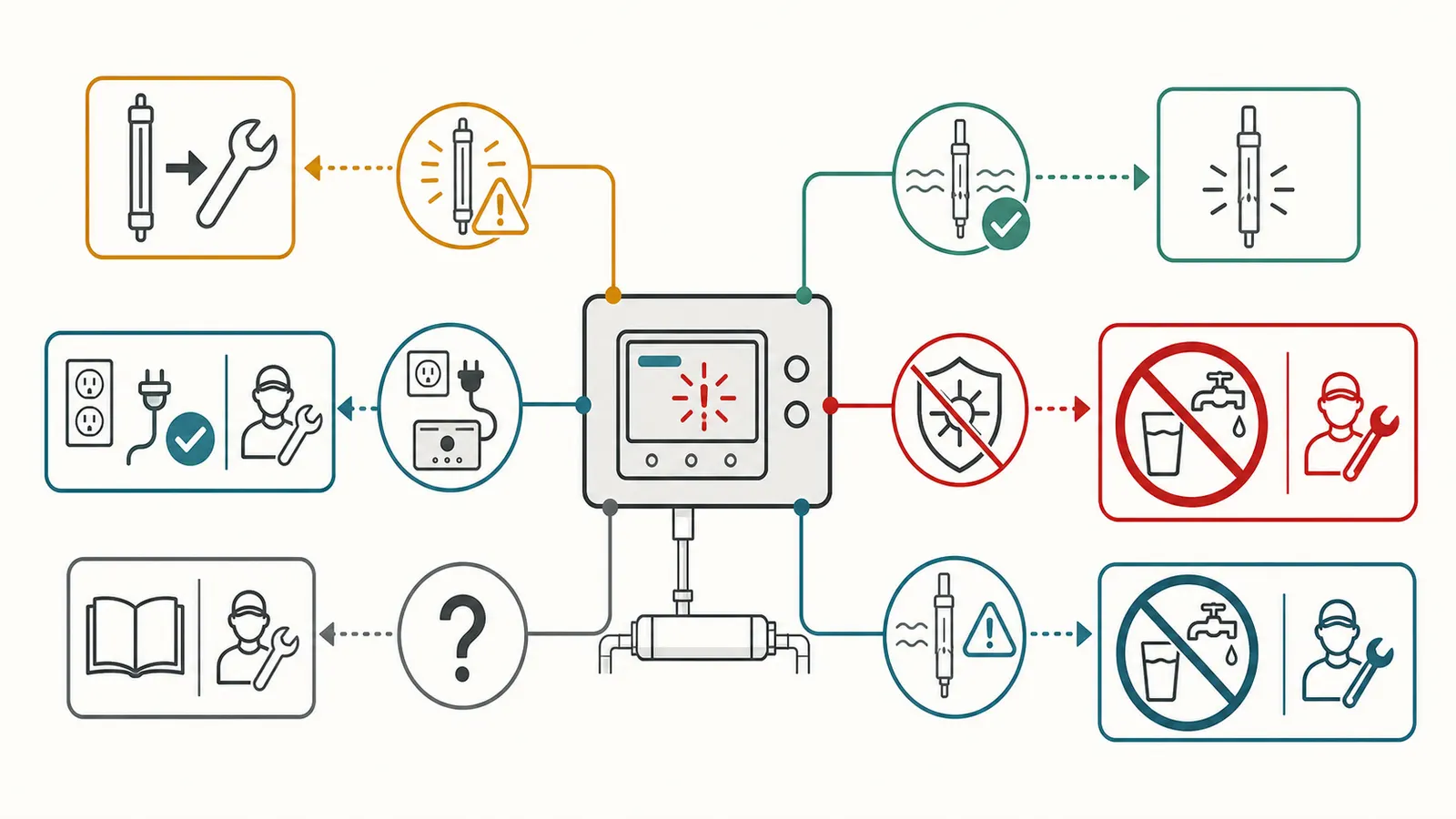
A UV water-system alarm means the controller cannot confirm that the unit is delivering its intended disinfection performance. It may be a routine lamp-life warning, a low-UV or unsafe-dose condition, a power or controller fault, a sensor problem, or a water-quality or flow condition that is reducing the dose. The beep is not a diagnosis by itself.
If the display says unsafe UV, low UV at the unsafe threshold, lamp failure, or otherwise shows that the dose cannot be verified, stop using the treated water for drinking, cooking, ice, brushing teeth, and infant formula. Use bottled or another verified safe source while you follow the exact owner’s manual and any local health-department guidance. Do not assume the water is safe because the lamp glows, the water looks clear, or muting the alarm makes the sound stop. Pentair’s PUV7/PUV14 manual explicitly says not to consume water at its unsafe UV indication, while CDC advises that suspected contaminated private-well water should not be drunk until it has been treated and checked. (Pentair’s PUV7/PUV14 manual, CDC guidance for treating well water)
This guide is a model-neutral decision surface. It tells you what to record, which external checks are reasonable, where the homeowner boundary ends, and what to bring to a water-treatment professional. It does not supply brand-specific reset sequences or certify that a particular alarmed system is safe.
Safety boundary: Do not open energized controls, test live wiring, open a well, pull a pump, enter a well pit or other confined space, loosen pressurized fittings, remove a relief valve, or manipulate pressurized equipment while troubleshooting. Assign electrical diagnosis, well and pump work, pressure release, lamp connections, sensor service, and chamber disassembly to a qualified professional following the exact equipment manual. The manufacturer’s sleeve procedure itself requires the water supply to be shut off, lines drained, and the unit depressurized before service. (VIQUA’s operation and maintenance manual)
The decision in one minute #
Use the controller’s own state—not the lamp’s visible glow—as the primary safety signal.
| What you can see or hear | What it may mean | Safe next action |
|---|---|---|
| “Replace lamp,” end-of-life, A3, or a days/hours countdown at zero | The lamp timer has reached the manufacturer’s service interval. | Record the message and lamp replacement date. Arrange the exact lamp replacement. Do not reset the timer before the lamp is replaced unless the manual specifically permits a temporary deferral. |
| Low UV, UV intensity falling, or a red/unsafe UV state | The controller is seeing insufficient UV intensity or cannot confirm the required operating condition. Causes can include a fouled sleeve or sensor, old lamp, poor UV transmittance, excessive flow, or a sensor fault. | If the controller marks the state unsafe or dose is unknown, stop consumption. Then follow the manual’s external checks and arrange service or testing. |
| Blank display, lamp failure, continuous or rapid alarm, or no power after an outage | The controller may not be detecting lamp current or may not be monitoring at all. | Stop relying on UV treatment. Check only the external power status that the manual allows you to observe. Do not open the controller or test live wiring. |
| Sensor fault, sensor signal, or sensor connection | The intensity reading may be unavailable or outside the controller’s operating range. | Treat the dose as unverified. Record the code and have the sensor and controller checked using the model manual. |
| Alarm began after a filter change, softener regeneration, cloudy water, pressure/flow change, or power event | A change upstream or in the electrical supply may have affected the water reaching the reactor or the controller’s measurement. | Record the event and timing. Do not infer that the event is the cause until the alarm clears and the system’s own status returns to normal. |
| A muted alarm with no visible warning | The sound has been deferred; the underlying condition may remain. | Treat mute as an attention-management feature, not a repair or safety clearance. |
The precise words and symbols vary. Copy the exact display text, code, color, and audible pattern into a log before pressing buttons. A professional can do more with “A3, intermittent chirp, lamp installed 14 months ago, alarm began after regeneration” than with “red light.”
What the UV system is—and is not—telling you #
A residential UV unit disinfects by exposing flowing water to ultraviolet light. The treatment is only one part of a chain: incoming water quality, pre-filtration, flow through the chamber, lamp output, quartz-sleeve condition, sensor measurement where fitted, electrical power, and the cleanliness of plumbing downstream. CDC explains that UV systems work better when water is filtered before UV treatment; it also says UV treatment does not remove chemicals. (CDC’s home water-treatment overview)
That distinction matters when an alarm starts. The controller may be monitoring lamp operation, UV intensity, or both. A lamp can still emit visible light while its useful UV output is no longer adequate. Clear water can still carry microorganisms, and clear water tells you nothing about dissolved chemicals. A certification mark describes the product’s evaluated claim and conditions; it is not a live reading of the unit in your basement today.
NSF identifies NSF/ANSI 55 as the standard for UV treatment systems and distinguishes Class A systems for contaminated water from Class B systems intended to reduce non-disease-causing bacteria in already disinfected drinking water. NSF also explains that residential water-treatment standards are voluntary national standards, not a ranking system. Confirm the exact model, class, and claim rather than treating “UV” or “NSF” as a universal promise. (NSF’s standards overview)
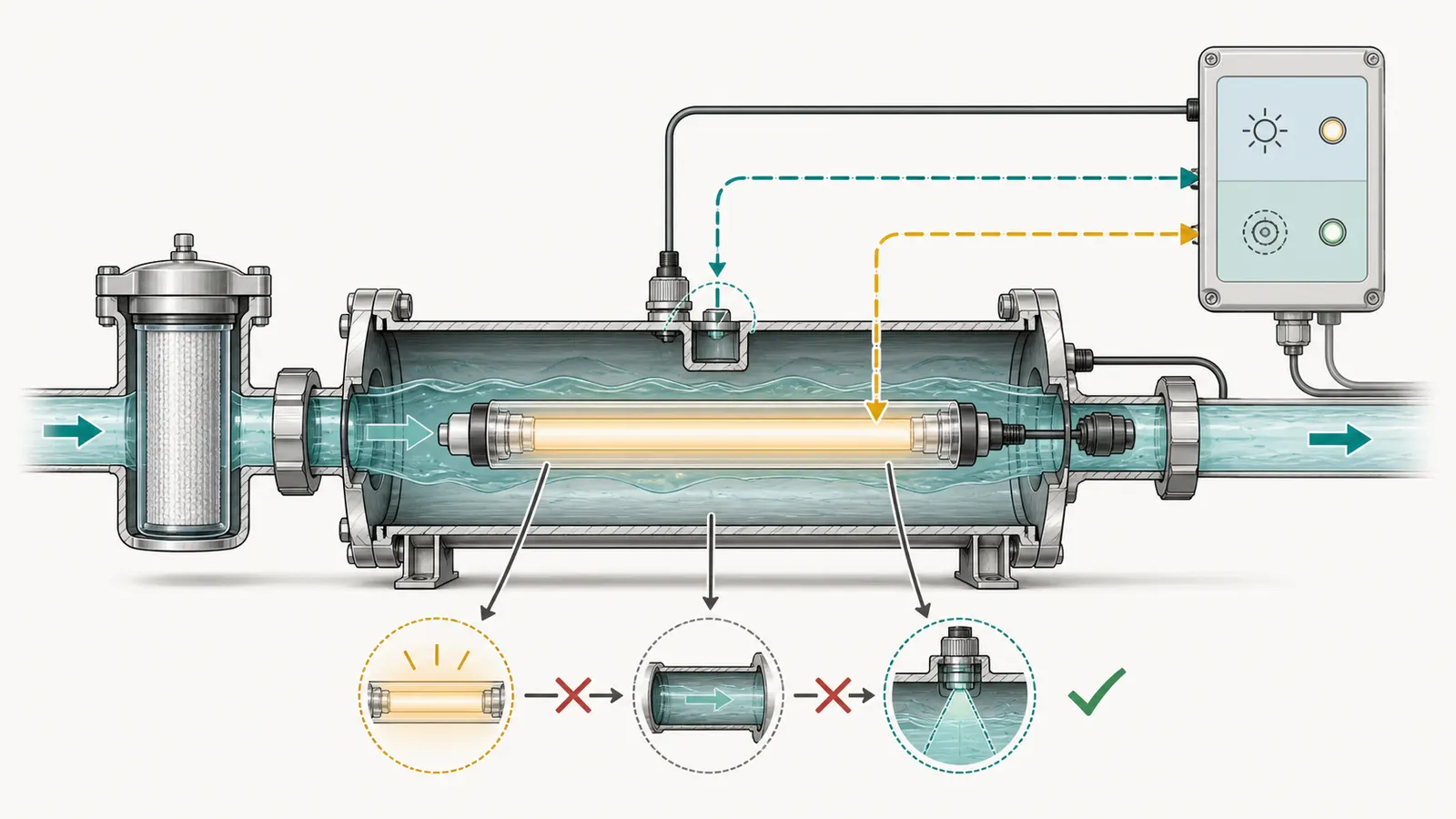
The practical interpretation is therefore:
- The alarm says something about the treatment system’s current operating condition.
- It does not, by itself, identify the failed component.
- It may not tell you whether the source water has a chemical problem.
- It does tell you when the system’s claimed protection is no longer something you should silently assume.
For a public-water home, first determine whether the UV unit is supplemental or whether the household is relying on it for a specific microbial risk. Check the utility’s current advisory status if there has been an outage or water-quality event. For a private well, treat an unverified UV alarm more conservatively because the UV system may be the principal barrier against germs in the source water. CDC says no single home treatment type protects against every problem and recommends matching treatment to the contaminant of concern. (CDC’s well-water guidance)
Alarm-to-action diagnosis #
Lamp-life warning
An end-of-life message is a maintenance warning with a safety consequence. VIQUA’s manual describes an effective lamp life of approximately 9,000 hours and recommends annual replacement for continuous protection; its controller can defer an end-of-life alarm for limited periods, but the alarm still calls for the lamp to be addressed. Pentair similarly describes a countdown to zero and limited seven-day deferrals for its PUV7/PUV14 controllers, while warning that every alarm condition should be remedied. (VIQUA’s operation and maintenance manual, Pentair’s PUV7/PUV14 manual)
What to observe:
- Exact text, code, and remaining days or hours.
- Lamp installation date, part number, and whether the timer was reset after the last replacement.
- Whether the alarm is only a periodic chirp or is accompanied by low UV, lamp failure, or a blank display.
- Whether water use changed at the same time.
What not to infer: a timer reset is not evidence of a new lamp, and a visible glow is not evidence of a valid dose. Do not silence the alarm and leave the date unrecorded. If the lamp has been replaced recently but the timer or alarm is wrong, stop repeating resets; the controller, lamp connection, wrong lamp, or installation may need a model-specific check.
Low UV or unsafe UV
Low UV is the most important branch because it concerns delivered intensity rather than only calendar age. VIQUA’s troubleshooting flow starts with pre-treatment filters, flushing, and then cleaning the sensor and quartz sleeve if the warning repeats. It also notes that a softener regeneration cycle can temporarily create water with low UV transmittance and trigger a sensor alarm. (VIQUA’s low-UV troubleshooting table)
Pentair’s manual shows why the displayed severity matters: one indication can mean the UV level remains within a safe range but service may soon be required, a later indication means immediate service, and its unsafe indication says the water should not be consumed. The manual tells the reader to examine the system and water supply for the reason. (Pentair’s UV-intensity guidance)
Treat a low-UV warning as a decision, not a suggestion to shop for a lamp:
- Warning but still within the model’s stated safe range: record the value and service promptly. Use the manual’s maintenance window; do not extend it by habit.
- Unsafe threshold, failed dose, or unknown UV value: stop consumption and use an alternate safe source.
- Low UV that returns after cleaning or filter service: stop cycling through resets. Have the source water, flow, UV transmittance, sensor, sleeve, and lamp output evaluated.
Lamp failure, blank display, or power event
Power is part of treatment. Pentair states that its monitoring system does not operate during a power failure and lists intermittent voltage drop, changed influent water quality, and incorrect sensor installation among possible low-UV causes. VIQUA’s troubleshooting material lists a tripped GFCI or breaker, controller damage, wet lamp connections, and lamp ignition or run faults among conditions associated with no power or lamp failure. (Pentair’s controller discussion, VIQUA’s troubleshooting tables)
Record whether the alarm began during or after a storm, outage, generator transfer, tripped breaker, pump restart, or other electrical event. A restored display does not prove that treatment was continuous during the interruption. If the home is on a well and the UV unit was offline while water was used, tell the professional how long the interruption lasted and which taps were used.
External observation can include whether the dedicated receptacle has power and whether the controller display is present, but only where the manual makes that a homeowner-safe check. Do not remove a cover, reach into a controller, probe a receptacle, reseat lamp pins, or handle a wet connector while energized. A qualified person should handle live wiring, GFCI diagnosis, controller replacement, lamp connections, and any pressure-side repair.
Sensor or controller fault
A sensor alarm means the controller’s measurement may be unavailable or outside the expected operating range. It is not permission to assume the last displayed percentage still applies. VIQUA’s manual separates sensor-connection and sensor-signal failures and directs the user to check the specified connection or contact support when the fault repeats. Pentair warns that its UV sensor is delicate and that the system’s warning signals should not be disregarded. (VIQUA’s sensor-fault guidance, Pentair’s sensor-maintenance warning)
Do not clean or remove a sensor merely because an internet checklist says to do so. Some units have no sensor; some have a delicate sensor window; and some manuals specify a particular chemical, soak time, seal inspection, or calibration path. Record the model and fault, then use the current manual. If the sensor reading is unavailable, use the stop-consumption rule for an unverified dose when UV is the relied-on microbial barrier.
Safe homeowner checks, in order #
The following checks are deliberately external and observational. Stop at the first point that requires opening a control, releasing pressure, loosening a fitting, handling a lamp, or changing a setting.
1. Capture the state before you change it
Photograph the display if safe, or write down:
- date and time;
- exact code, words, symbols, color, and audible pattern;
- UV percentage, intensity, dose, or remaining lamp days if displayed;
- whether the display is blank, cycling, or normal between alarms;
- last known normal state;
- whether the alarm clears and returns.
Do not press mute, reset, or acknowledge first unless someone is at immediate risk from the sound. If you must mute it, record the time and the displayed state before and after.
2. Check the water-use context
Write down whether anyone used water for drinking, cooking, ice, brushing teeth, infant formula, bathing, laundry, or pets after the alarm. This is not a contamination test; it gives the professional and health department a timeline. If the water is from a private well and the system was the microbial barrier, move drinking and food preparation to bottled or another verified safe source while the alarm is unresolved.
If a public-health advisory, flood, sewage event, unexplained illness cluster, or sudden change in well water is involved, contact the local health department. Do not use a UV alarm as a substitute for source-water testing. CDC says suspected contaminated well water should not be drunk and that testing is needed to verify treatment before reuse. (CDC’s private-well contamination guidance)
3. Inspect only what is visible from a safe position
Look for a wet floor, active leak, condensation, a cracked housing, a damaged cord, a tripped external breaker or GFCI indicator, a failed pre-filter, or visibly cloudy or colored water at a normal fixture. Do not touch water near electrical equipment. Do not infer that no leak means the UV dose is adequate.
If the pre-filter is visibly exhausted, record its label, change date, differential-pressure indicator if fitted, and whether the alarm began after the cartridge was changed. A filter that looks clean may still be the wrong micron rating or may have been installed in the wrong position. A filter that looks dirty may be doing its job. Use the installed system’s manual and filter schedule rather than a universal replacement interval.
4. Check recent system events
Ask:
- Was there a power outage, brownout, storm, generator changeover, tripped breaker, or pump fault?
- Did a water softener regenerate immediately before the alarm?
- Was a sediment, carbon, iron, or other pre-treatment filter changed, bypassed, or exhausted?
- Did flow or pressure change at fixtures?
- Was the plumbing drained, disinfected, remodeled, or left unused?
- Has the lamp, sleeve, sensor, controller, or power supply been serviced?
VIQUA specifically notes softener regeneration as a possible short-term low-UV-transmittance event and directs attention to flushing and longer-term softener settings when the alarm repeats. That is a useful lead, not a universal explanation. (VIQUA’s UVT troubleshooting note)
5. Compare flow only with documented limits
Do not install a flow restrictor, close a valve, change a pressure setting, or throttle a pump to make an alarm disappear. An over-capacity flow can reduce contact time or dose, but the correct limit belongs to the exact model and certified operating condition. Pentair’s manual ties published flow to model, dose, and UV-transmittance conditions and says a flow restrictor, where used, must be installed in the correct direction to help maintain rated flow. (Pentair’s flow and specification guidance)
You may record which fixtures were open when the alarm occurred, whether the alarm appears only at high demand, and the approximate time of a normal bucket fill if that is safe and useful. Do not convert that observation into a certified flow measurement or conclude that a clear display at low flow proves high-flow performance.
When water use must stop #
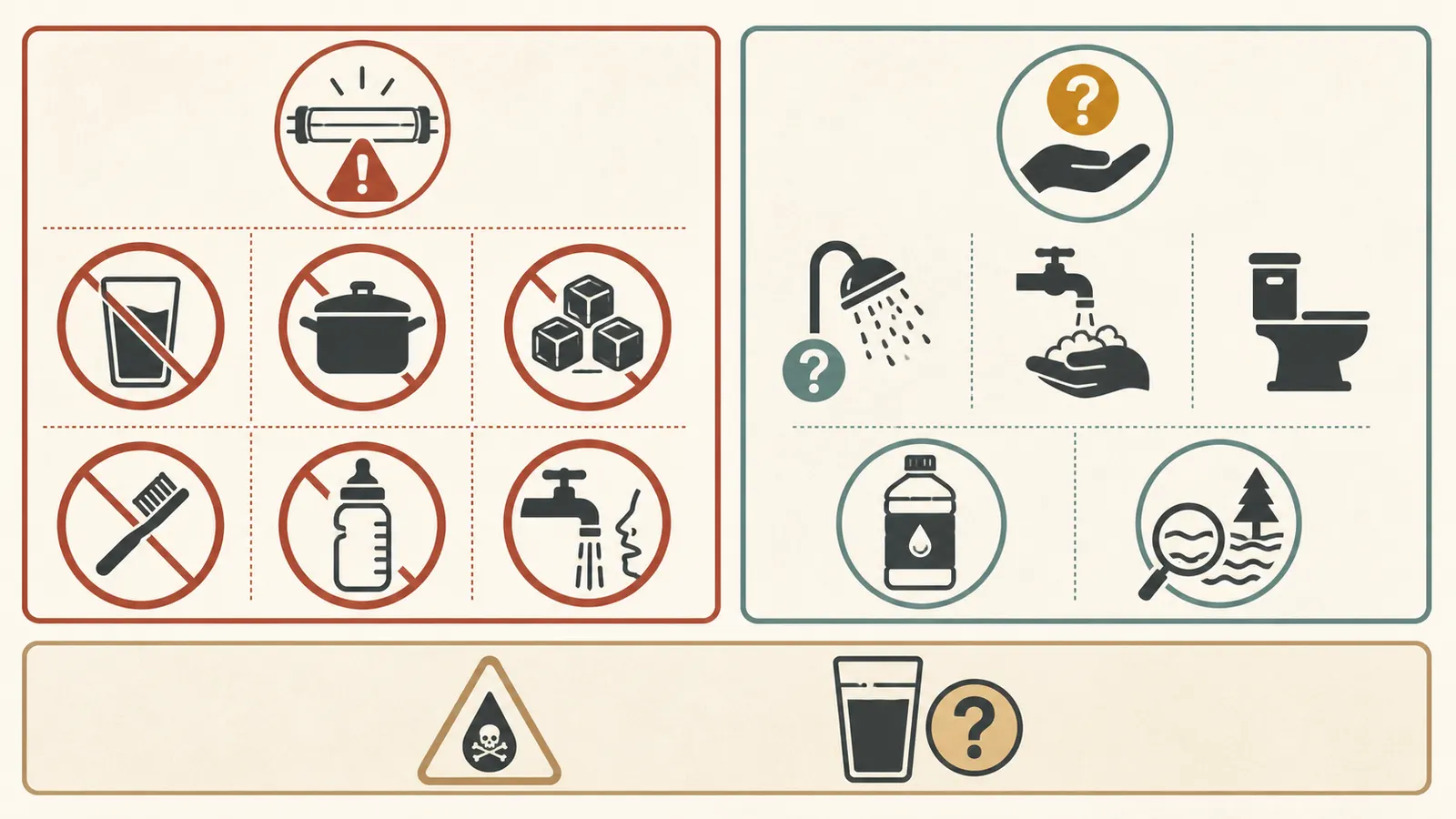
The conservative rule is simple: when a UV system reports an unsafe UV condition, lamp failure, no verified UV dose, or an unresolved state that matters because UV is the microbial barrier, do not consume the treated water. Pause drinking, cooking, ice, brushing teeth, and infant formula. Use bottled water or another source known to be safe.
That rule is narrower than saying every beep means the entire property is contaminated, and stronger than saying every beep is harmless. A lamp-life warning that the controller still identifies as within its safe operating range is different from an unsafe low-UV indication. Because codes differ, the exact manual and the controller’s severity state control the branch.
Bathing, showering, laundry, and contact with water require context. A UV alarm alone does not tell you whether the source has germs, chemicals, or only a failed monitor. Ask the local health department or the treating professional if source contamination is suspected, if a public advisory applies, if someone in the home is medically vulnerable, or if you need a boundary for non-consumption uses. If chemical contamination is suspected, do not improvise a UV, boiling, or filtration workaround: CDC states that chemically contaminated well water should not be used for any purpose until it has been treated to remove the chemicals. (CDC’s guidance for contaminated well water)
Boiling is not a universal answer. It can address some microbial risks under appropriate emergency guidance, but it does not remove chemicals, and it does not repair an undersized, failed, or unmonitored UV system. Follow the instructions from the local health authority for the suspected contaminant and the affected uses.
Do not reopen consumption merely because:
- the lamp visibly lights;
- the water looks clear or tastes normal;
- the alarm was muted;
- the breaker was reset;
- a filter was changed;
- the alarm stopped for a few minutes;
- another household tap looks normal; or
- the product is labeled or certified for UV treatment.
Those observations may be useful clues. None is a substitute for the controller’s normal verified state, the exact manual’s return-to-service steps, and any water testing or health guidance required by the situation.
Reset, flush, test, and return to use #
Reset only after the cause is addressed
Reset steps are model-specific. The VIQUA and Pentair manuals both include timed deferrals or resets, but their displays, timing, and consequences are not interchangeable. A reset can silence an alarm, restart a timer, or temporarily re-enable a valve without proving that the lamp, sensor, sleeve, flow, or water quality is correct.
Use this sequence:
- Record the fault and stop-use decision.
- Read the exact model and revision of the owner’s manual.
- Identify whether the manual calls the condition a warning, failure, unsafe UV level, or service lockout.
- Perform only the external checks the manual permits without opening energized controls or pressurized equipment.
- Have lamp, sleeve, sensor, power, plumbing, flow, and water-quality work completed by a qualified person when required.
- Complete the manual’s post-service flush or disinfection procedure.
- Reset the timer or controller only after the relevant component is actually replaced or serviced.
- Confirm the display returns to the model’s normal state and record the date, parts, readings, and person who performed the work.
VIQUA’s sleeve procedure requires shutting off the water, draining lines, and depressurizing before service; it also says mineral coating reduces UV reaching the water and that a damaged or incompletely cleanable sleeve must be replaced. That is why this page does not turn sleeve cleaning into a casual “wipe it off” instruction. (VIQUA’s quartz-sleeve procedure)
Flush is not the same as proof
Flushing can remove stagnant or recently changed water from a chamber or line, and a manufacturer may prescribe it after service or a water-quality event. It does not prove that a lamp is producing the required output, that the sensor is accurate, that flow is within the rating, or that the source water is free of pathogens or chemicals.
If the alarm persists, returns after flushing, or follows a source-water change, request the specific evaluation that matches the branch:
| Pattern | Information or test to request |
|---|---|
| Lamp-age warning or lamp failure | Lamp part number, installation date, timer state, controller fault history, and lamp-output or current check per the model manual |
| Low UV after filter or softener event | Pre-treatment condition, flow at the UV unit, UV-transmittance or water-quality evaluation, and softener regeneration settings |
| Low UV after sleeve cleaning | Sleeve condition, sensor-window condition, sensor reading, seals, and correct reassembly |
| Alarm only at high demand | Actual flow at the UV unit compared with the exact model’s rated/certified condition |
| Alarm after outage or breaker event | Power quality, GFCI/controller condition, lamp connection, and the duration of treatment interruption |
| Alarm cleared but water test is positive | Downstream plumbing, bypasses, dead legs, sampling method, and the complete disinfection/flush procedure |
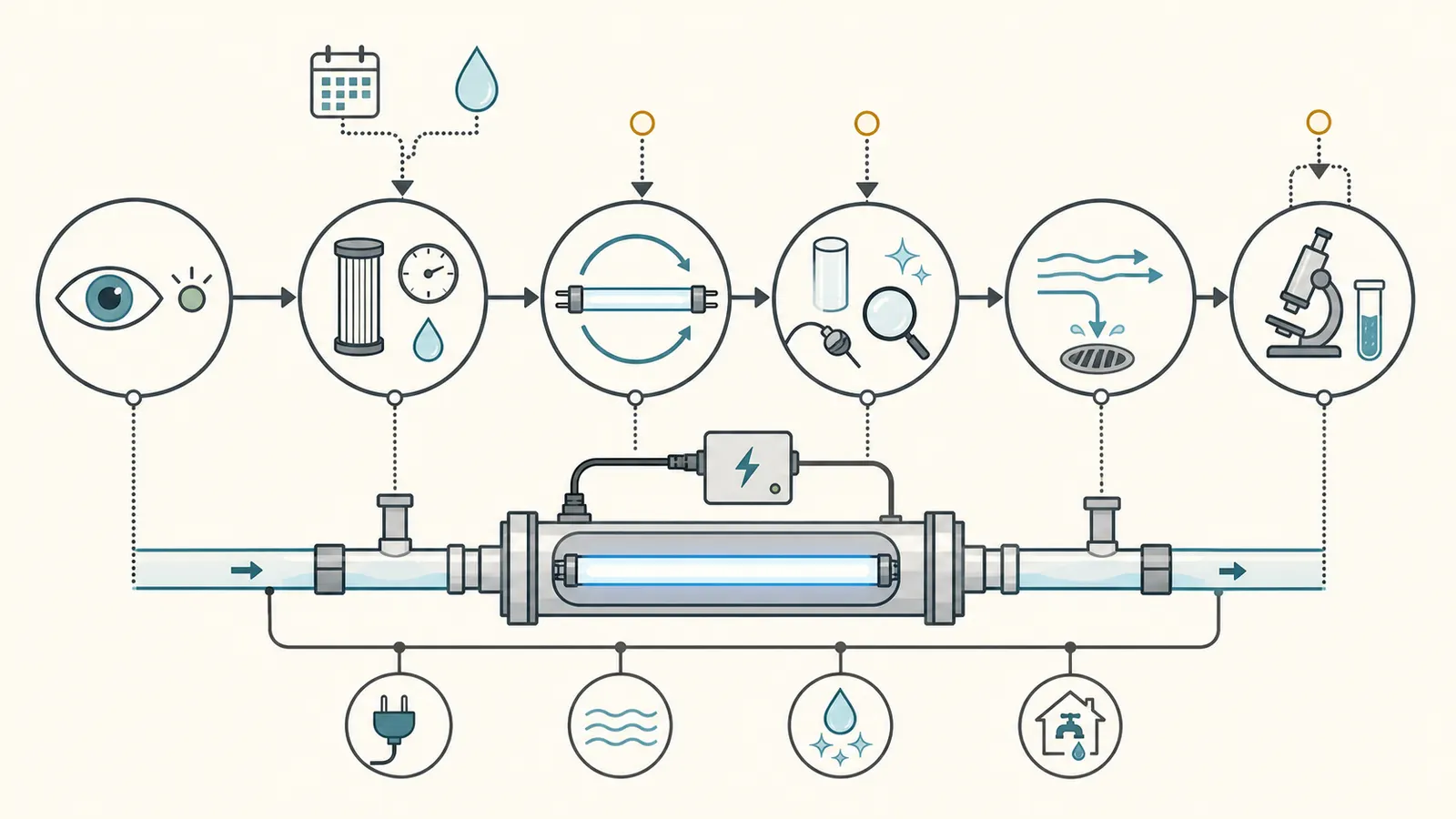
VIQUA’s troubleshooting table notes that bacterial contamination can come from equipment or distribution lines downstream of the UV unit and calls for downstream cleaning and attention to dead ends. A normal UV controller reading therefore does not eliminate a post-treatment plumbing problem. (VIQUA’s bacterial-contamination troubleshooting)
Return to drinking water only when the controller is in its documented normal state, the underlying fault has been corrected, the manual’s post-service steps are complete, and any applicable testing or health-department direction supports reuse. For a confirmed or suspected private-well contamination event, CDC’s direction is to use a safe alternative, contact the health department, treat the water, and test it before drinking or using it again. (CDC’s return-to-use guidance)
Build the alarm log and service handoff #
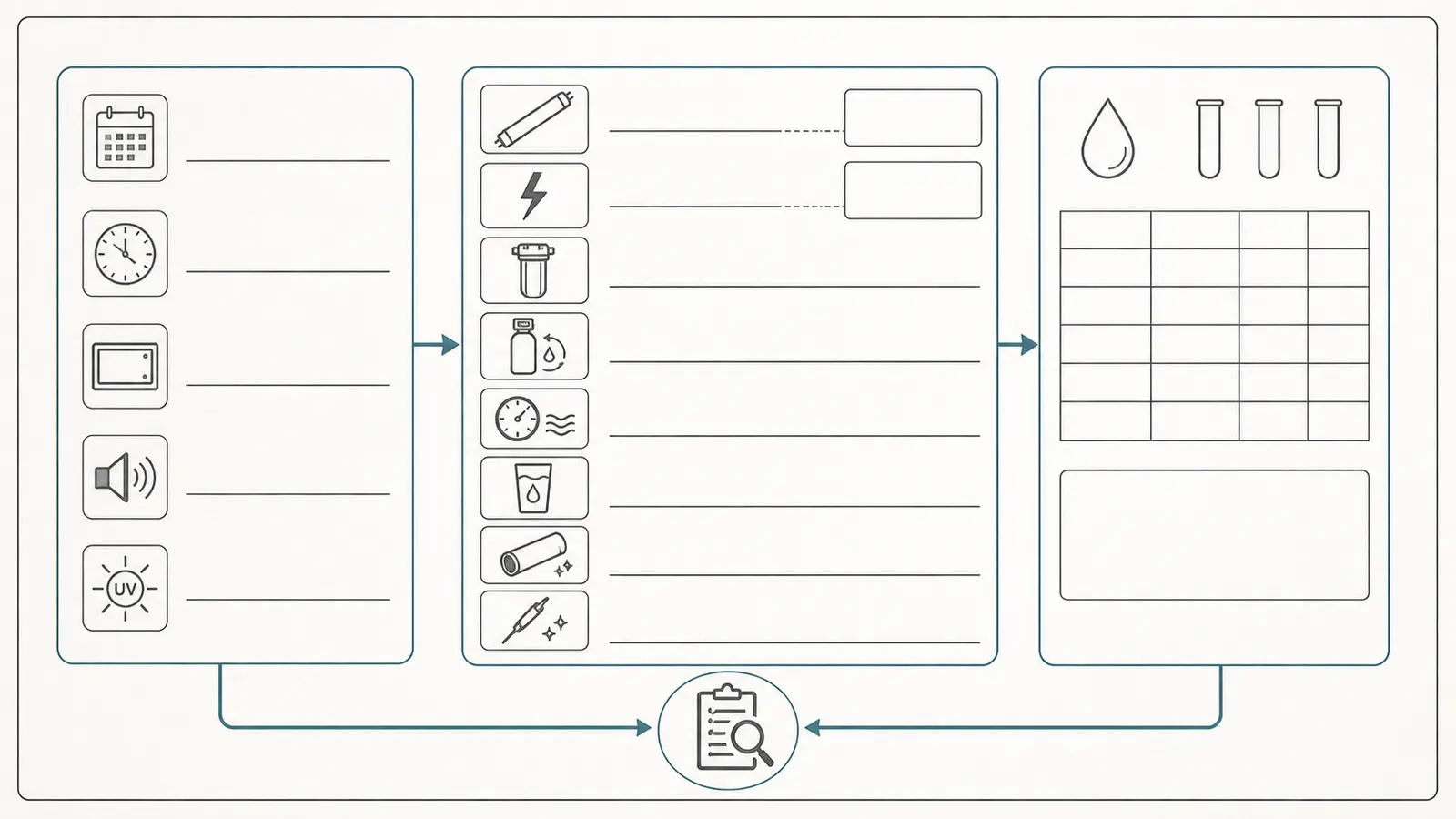
An alarm log is more useful than a list of possible causes because it preserves sequence. Start one now, even if the issue turns out to be a routine lamp replacement.
| Log field | Record |
|---|---|
| Date and time first noticed | ______________________________ |
| Exact code or screen wording | ______________________________ |
| Light color, icon, and audible pattern | ______________________________ |
| UV intensity, percentage, dose, or lamp days shown | ______________________________ |
| Controller display before and after acknowledgement | ______________________________ |
| Lamp part number and installation date | ______________________________ |
| Lamp hours/days shown by controller | ______________________________ |
| Last quartz-sleeve cleaning or replacement | ______________________________ |
| Last sensor cleaning, replacement, or calibration | ______________________________ |
| Pre-filter type, size, and last change | ______________________________ |
| Softener regeneration date/time and settings known | ______________________________ |
| Power outage, breaker, GFCI, generator, or pump event | ______________________________ |
| Flow, pressure, or fixture-use change | ______________________________ |
| Water clarity, color, odor, or sediment observation | ______________________________ |
| Bypass or valve position observed | ______________________________ |
| Water-use boundary applied | ______________________________ |
| Service performed and by whom | ______________________________ |
| Post-service display and flush | ______________________________ |
| Water-test laboratory, date, sample point, and result | ______________________________ |
Bring a photograph of the controller label, chamber label, lamp label, pre-filter labels, recent water tests, and any water-softener or pump-service record. Include the model and serial number, not just the retailer’s product family name. If you do not know whether the unit is Class A or Class B, record that as unknown rather than guessing from the word “UV.”
A maintenance rhythm that stays model-specific
- Whenever you pass the controller: look for an active alarm and record a new code rather than relying on memory.
- At pre-filter service: record the date, cartridge, visible condition, pressure/flow symptoms, and whether the UV alarm changed afterward.
- At the manual’s lamp interval: replace the exact lamp specified for the unit and reset the timer only as instructed.
- At sleeve or sensor service: follow the manual’s shutoff, drain, depressurization, chemical, seal, and reassembly requirements. Do not treat a generic video as permission to handle this equipment.
- After an outage, bypass, plumbing change, flood, or source-water event: document the interruption and follow the manual and local health guidance for flushing, disinfection, and testing.
- After a persistent or repeated alarm: escalate rather than repeatedly muting or resetting. Ask for the measurement that would prove the branch—flow, UV transmittance, sensor output, lamp output, power quality, or microbiological testing.
The goal is not to identify a failed part from a sound. It is to keep a homeowner from crossing an invisible boundary: drinking water while UV dose is unknown. Record the state, apply the narrow stop-use rule when the controller says unsafe or the treatment barrier cannot be verified, and let the exact manual, qualified service, testing, and local health guidance determine the return to use.
Cite this guide
Brictale. “What Does a UV Water System Alarm Mean?.” Published 2026-08-29; updated 2026-08-29.
https://brictale.com/water/filtration/what-does-a-uv-water-system-alarm-mean · Read the Markdown version
Sources and scope
Evidence behind this page
- CDC says ultraviolet treatment systems use UV light to disinfect water or reduce germs; with pre-filtration they can remove or inactivate parasites, bacteria, and viruses, but they do not remove chemicals.
CDC — About Home Water Treatment Systems
CDC's general consumer guidance for home UV treatment; the exact contaminants and performance claim for a particular installed unit depend on its label, certification, design, water quality, and operating conditions.
Accessed · Link to this claim - CDC says that if private-well water is contaminated with harmful germs or chemicals, or contamination is suspected, the owner should not drink it, should use bottled or another safe source, contact the local health department, and test the water before returning to use.
CDC — Guidelines for Treating Well Water
CDC guidance for suspected or confirmed private-well contamination; local health or environmental authorities determine advisory, testing, treatment, and reuse details.
Accessed · Link to this claim - NSF identifies NSF/ANSI 55 for UV treatment systems and distinguishes Class A systems for contaminated water from Class B systems that reduce non-disease-causing bacteria in disinfected drinking water; NSF also says residential treatment standards are voluntary national standards rather than a ranking system.
NSF — Standards for Water Treatment Systems
NSF's consumer explanation of standards and protocols; certification status and class must be verified for the exact model and do not establish that an alarmed unit is currently delivering its intended dose.
Accessed · Link to this claim - The VIQUA manual states that the lamp has an effective life of approximately 9,000 hours and recommends annual replacement for continuous protection; its end-of-lamp-life alarm can be deferred for limited periods, but the lamp still needs to be addressed.
VIQUA — MNL520351-R Rev P Operation and Maintenance Manual
The cited VIQUA manual's lamp-life and alarm behavior for covered VIQUA systems; other manufacturers and models can specify different timers, service lives, and deferral behavior.
Accessed · Link to this claim - The VIQUA manual says mineral coating on a quartz sleeve reduces UV light reaching the water and therefore reduces performance; it requires the water supply to be shut off, lines drained, and the unit depressurized before sleeve service, and says a scratched, cracked, or incompletely cleanable sleeve must be replaced.
VIQUA — MNL520351-R Rev P Operation and Maintenance Manual
The cited VIQUA sleeve-maintenance procedure; it is manufacturer-specific service guidance and supports the article's general warning that sleeve condition affects performance, not a universal homeowner service procedure.
Accessed · Link to this claim - The VIQUA manual's troubleshooting flow for low UV calls for checking and replacing pre-treatment filters as needed, flushing the chamber, then cleaning the UV sensor and quartz sleeve if the alarm repeats; it also notes that a water softener regeneration cycle can create short-term low-UV-transmittance water and a sensor alarm.
VIQUA — MNL520351-R Rev P Operation and Maintenance Manual
VIQUA's low-UV troubleshooting and UVT notes for covered sensor-equipped systems; the sequence is not a substitute for another model's manual or for laboratory UV-transmittance testing.
Accessed · Link to this claim - The VIQUA manual lists power interruptions, tripped GFCI or breaker, controller damage, lamp connection or moisture faults, and sensor or controller failures among possible fault conditions; it tells the reader to follow the fault screen and contact support when specified.
VIQUA — MNL520351-R Rev P Operation and Maintenance Manual
The cited VIQUA troubleshooting tables and fault screens; component names and homeowner-accessible checks vary by model.
Accessed · Link to this claim - The Pentair PUV7/PUV14 manual says a lamp-life alarm can be deferred only in limited seven-day intervals and warns that every alarm condition should be addressed; it separately describes a blank display and audible tone for lamp failure.
Pentair — PUV7 and PUV14 UV Systems Manual
Pentair PUV7 and PUV14 systems and their controller; alarm codes, display states, deferrals, and reset actions are not model-agnostic.
Accessed · Link to this claim - The Pentair manual says that at its unsafe UV-intensity indication the water should not be consumed, and that the system or water supply should be examined to determine the reason for the low UV level.
Pentair — PUV7 and PUV14 UV Systems Manual
Pentair's displayed UV-intensity bands for the PUV7/PUV14 manual; the article uses this as a manufacturer example for the stop-consumption decision, not as a universal code or threshold.
Accessed · Link to this claim - The Pentair manual says its monitoring system will not operate during power failures and lists intermittent voltage drop, changed influent water quality, and incorrectly installed sensors as possible causes of low-UV conditions; it also warns not to disregard warning signals.
Pentair — PUV7 and PUV14 UV Systems Manual
Pentair's controller and low-UV discussion for the PUV7/PUV14 family; other systems may monitor different signals or use different alarm logic.
Accessed · Link to this claim - Pentair's manual says a flow restrictor can help maintain the manufacturer's rated flow and must be installed in the correct direction; its published flow and dose values are tied to model, dose, and UV-transmittance conditions.
Pentair — PUV7 and PUV14 UV Systems Manual
Pentair installation and specification tables for PUV7/PUV14; homeowners must use the exact unit's rated flow, plumbing, and certification conditions.
Accessed · Link to this claim